
How to post a panorama on Instagram
Instagram crops a wide photo to fit its feed. Cut it into a carousel of slides that line up, and people swipe through the whole view. Feedscape does the cutting for you, in your browser.
Why Instagram crops a panorama
The feed shows photos from 3:4 (tall) to 1.91:1 (wide). A photo wider than 1.91:1 is cropped to fit when you post it, and Instagram has no panorama viewer. The whole panorama fits in one post only on a border, where it shows small.
The fix is a carousel: the panorama cut into slides of the same size, posted together. As people swipe, each slide joins the next, and the panorama shows much bigger than it would in one post. A carousel holds 2 to 20 slides.
How Feedscape splits it
The shape of each slide. 3:4 by default: it shows biggest in the feed, and fills its tile in your profile grid exactly. 4:5 and square (1:1) are there too.
How many slides. A panorama is cut into 3 or 4 parts, whichever fits its shape with the least cropped: three 3:4 slides make 2.25:1, four make 3:1. You can pick 2, 3 or 4. The cuts are kept off faces and detail. A very wide panorama goes whole onto a border instead of losing too much.
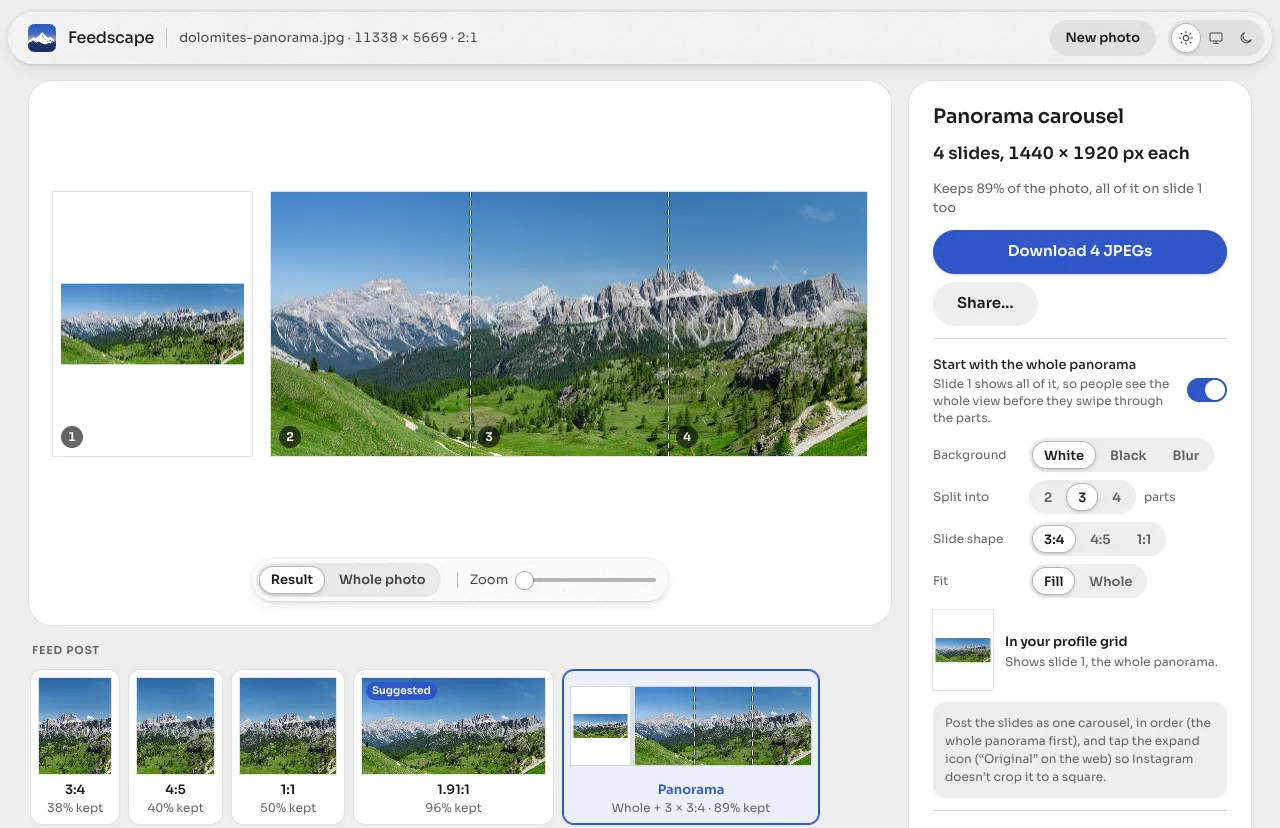
The whole panorama first. Your profile grid shows only the first slide of a carousel, and a panorama’s left edge is rarely a good cover. So slide 1 shows the whole panorama, fitted into a slide of the same size on white, black or a blur of the photo, and the parts follow. You can turn it off.
Exact sizes. Every slide is the same size: 1440 × 1920 pixels for 3:4, 1440 × 1800 for 4:5 and 1440 × 1440 for square, or 1080 or 2160 pixels wide if you pick. The panorama is resized once, as one strip, and cut at exact pixels, so the slides line up.
Step by step
- Open Feedscape and pick your panorama. Choose it, drop it in or paste it. It stays on your device.
- Choose Panorama carousel. Feedscape suggests it when one post would crop more than a tenth of the photo; otherwise, pick its card.
- Adjust if you like. Drag the parts to move the photo inside them, or zoom. Change how many parts, their shape, and whether slide 1 shows the whole panorama.
- Download. You get one JPEG per slide, numbered in order, such as
dolomites-panorama_feedscape-pano-3x4_01-of-04_1440x1920.jpgto…_04-of-04_…. On a phone, Share saves them too. - Post them as one carousel. Start a new post in Instagram, select several photos, and pick the slides in order, starting with 01: a carousel keeps the order you pick them in.
- Keep their shape. Tap the expand icon (“Original” on instagram.com) before you go on. If the frame stays square, Instagram crops every slide.
Made them on a computer? Move them to your phone without shrinking them: AirDrop, a cable, or a cloud drive’s original file. Chat apps resize photos.
Questions
Will there be a seam between the slides?
The slides themselves line up to the pixel. Instagram compresses each slide on its own, which can leave a very slight difference at a join in fine detail, and whether a thin gap shows while swiping isn’t settled. That is why Feedscape keeps the cuts away from faces and detail.
Will my panorama lose quality?
As little as possible. The slides are at the exact sizes Instagram uses, so they aren’t resized again when you post. Feedscape never enlarges your photo, and resizes it only once, with light sharpening.
Is my photo uploaded?
No. Everything happens in your browser, so your photo never leaves your device. The slides have their metadata removed, including where the photo was taken. More in Privacy.
Can I change the slides after posting?
You can reorder or delete them, but not add one, so post every slide at once.
Does it cost anything?
No. Feedscape is free, with no account and no ads. It makes the other Instagram shapes too: see How it works.